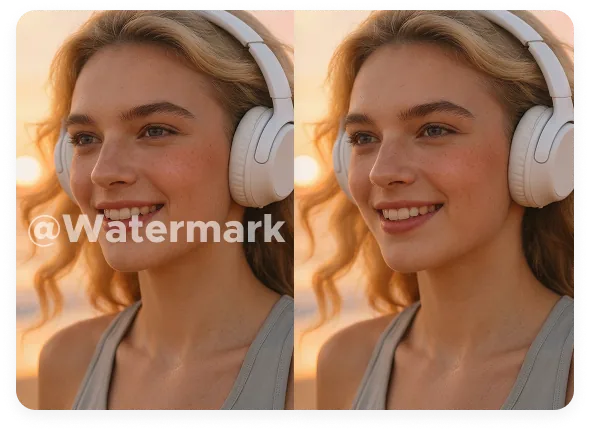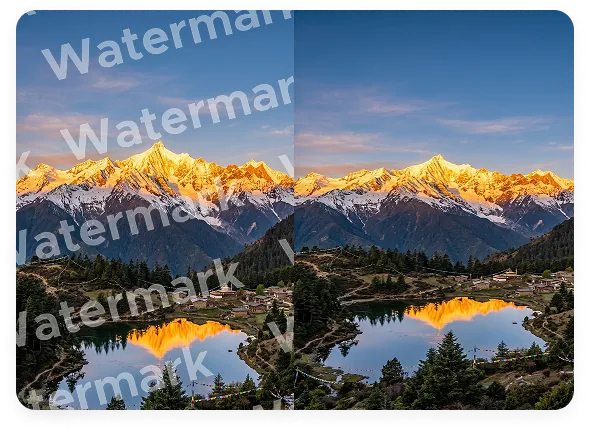
Free AI Image Watermark Remover

Remove watermarks, logos, text overlays, date stamps, camera info, and author names from photos with Morph AI Image watermark remover. Morph automatically detects and removes marks from product photos, screenshots, portraits, TikTok photos, and Instagram pictures without blur or quality loss. Remove watermark from photo files online, then continue editing directly inside Morph.


Upload your image here
Image watermark remover hero preview
Morph Studio AI image watermark remover example for product photo cleanup

Remove Photo Watermarks for Free

Erase text overlays, date stamps, camera info, author names, signatures, and unwanted marks from photos with one click. Upload a JPG, PNG, or WEBP image, and let Morph remove watermark from image files with automatic AI detection and cleanup. Keep product shots, portraits, screenshots, and social creatives sharp and usable with no blur patch and no quality loss. After cleanup, you can continue refining with image to image or export right away.

Get Started Now
AI image cleanup for dense backgrounds and text overlays

AI Auto Removal
No Manual Brush

Smart AI detection handles full-screen or repeated watermarks without endless manual brushing. Morph automatically identifies the watermark area and patterns, analyzes nearby texture, edges, color, and lighting, then updates only the marked region with AI. Even watermarks placed over skin, fabric, reflections, packaging, or busy backgrounds can be cleaned up with far less manual effort and a more natural-looking result.

Get Started Now
High-quality image watermark removal with preserved texture and edges

High-Quality Cleanup
No Photoshop Needed

If you've ever wondered how to remove a watermark from a photo without installing Photoshop, Morph gives you a faster online way to do it. Remove watermarks without Photoshop while keeping your image crisp, clear, and high quality. Details stay sharp, colors stay true, and the final photo still looks like the original, just without the mark.

Get Started Now

Morph Image Watermark Remover Showcase

See how Morph removes full-screen watermarks, repeated marks, timestamps, camera info, and author names from photos while preserving edges, texture, and natural-looking detail.


Image watermark remover showcase 1Image watermark remover showcase 2Image watermark remover showcase 3Image watermark remover showcase 4

How to Remove Watermarks from Images

Clean up any photo in 3 simple steps

1

Upload Your Image

Upload the image you want to clean. Works with JPG, PNG, WEBP, product photos, screenshots, product photos, portraits, and any images with watermark.

2

AI Detects and Removes the Watermark

Once your image is uploaded, Morph automatically detects the watermark, logo, timestamp, camera info, author name, or repeated text overlay and uses AI algorithms to remove it. No manual brushing or masking is required.

3

Preview and Download

Check the cleanup result, compare the original and cleaned image online, and download your clean image in high quality.

Frequently Asked Questions

Everything you need to know about removing watermarks from images

What can Morph remove from an image?
Morph removes watermarks, logos, date stamps, camera info, author names, signatures, labels, captions, and unwanted text from images. It works well on product photos, portraits, screenshots, social creatives, and AI-generated visuals.
Will removing the watermark blur the image?
No. Morph analyzes nearby textures, color, edges, and lighting to rebuild the marked area more naturally, so the result stays sharp and natural without obvious blur patches.
Can it remove date stamps, camera info, author names, and text overlays?
Yes. Morph can clean date stamps, camera info, author names, signatures, logos, and text overlays. After upload, the AI automatically identifies the marked area and removes it without manual masking.
Does it work on tricky areas like hair, fabric, reflections, or packaging?
Yes. Morph is designed to rebuild busy backgrounds and detailed surfaces more naturally than simple blur-based cleanup. It can also handle full-screen or repeated watermarks over complex areas like hair, fabric, reflections, and packaging while preserving edges and texture as naturally as possible.
What image formats are supported?
JPG, PNG, WEBP, and most common image formats. You can use screenshots, product photos, portraits, and AI-generated images of different sizes.
Can I use it for product photos, screenshots, and social images?
Yes. Morph is useful for e-commerce product photos, screenshots, creator assets, marketing images, and branded visuals that need old marks or text cleaned up before reuse. If you also want to cut out the subject after cleanup, pair it with our image background remover workflow.
How to remove a watermark from a photo?
Upload your image, let the AI detect the marked area, compare the before and after online, and download the clean result. It's a simple way to remove watermark from photo files without manual retouching or installing Photoshop.
How to remove TikTok watermark?
Morph works as a TikTok watermark remover free option for still images, saved frames, and exported pictures. If you are looking for a watermark remover tiktok tool, you can also use Morph as an instagram watermark remover or runway watermark remover for social images, screenshots, and AI-generated exports.
How to remove watermark from image?
Upload the image, let the AI detect the marked area, preview the result, and download the clean version. If you need to know how to remove watermark from image files without Photoshop, Morph gives you a fast online workflow.
How to remove watermark from a picture?
Upload the picture, let Morph identify the watermark area, compare the before and after online, and export the clean version. If you have searched how to remove watermark from a picture, this is the simple no-brush way to do it.
Is Morph a watermark eraser?
Yes. If you are looking for a watermark eraser, a dewatermark tool, or a simple watermark remover image workflow, Morph helps clean marks online in a few clicks. Some users search terms like delete watermark photo or delete watermark image, but the goal is the same: remove the mark and keep the picture clear.
Is it free to use?
Yes. If you're looking for a free watermark remover, Morph Studio lets you start online in seconds. If you're searching for a watermark remover free tool, you can try cleanup with limited free generations before upgrading for higher limits and advanced workflows.

Remove Watermarks from Photos Now

Upload your image, clear the watermark, and download a clean photo in seconds.

Morph Studio
Email
Continue
By continuing, you agree to theTerms of ServiceandPrivate Policy.